Odoo evolves every year. Each new version introduces improvements in performance, security, usability, and functionality, from backend infrastructure upgrades to new industry packages and AI-ready features. However, many businesses continue running older Odoo versions long after newer ones are available.
An Odoo upgrade is not just a technical update. It is a structured process designed to keep your ERP system reliable, supported, and aligned with how your business grows. The process is also often referred to as “migration,” an Odoo upgrade is more than just moving data to a newer version. Understanding why upgrades matter and how they are officially handled helps organizations move forward with confidence instead of hesitation.
1. The Common Hesitation Around Upgrades
1.1 The Upgrade Myth
Upgrading Odoo is often perceived as risky, time-consuming, or unnecessary. Many organizations worry that an upgrade will disrupt daily operations, cause data loss, or break existing customizations. Others assume that as long as the system is still functioning, there is no immediate need to change anything.
In reality, Odoo upgrades are not ad-hoc technical exercises. For Enterprise users, the migration process is handled through Odoo’s official upgrade services, which rely on standardized migration scripts, controlled test environments, and SLA-backed support. The process is structured, repeatable, and designed to minimize operational disruption when executed correctly.
1.2 The Real Impact of Skipping Upgrades

Starting in April 2026, Odoo will support all versions indefinitely. However, customers who remain on older versions will incur a 25% increase in annual subscription fees. This policy shift changes how businesses should view upgrades. Remaining on legacy versions is no longer a neutral decision, it carries direct financial consequences.
Beyond the subscription increase, the technical burden also compounds over time. Older versions gradually lose access to performance improvements, security patches, and bug fixes. As databases, operating systems, and underlying libraries evolve, maintaining compatibility becomes increasingly complex. The system may still run, but it becomes harder to maintain, more expensive to support, and disconnected from new features designed to improve efficiency and automation.
What appears to be short-term convenience can therefore turn into long-term financial exposure and technical debt.
2. Why You Must Upgrade Your Odoo Regularly
2.1 For CTOs: Performance, Security, and Scalability
From a technical perspective, each latest version strengthens the system’s foundation. Newer versions adopt updated PostgreSQL, Python, and operating system libraries, resulting in improved speed, better resource utilization, and stronger security.
Upgrades also reduce technical debt. Legacy dependencies and outdated code paths are removed, making the system easier to maintain and extend. For organizations operating multi-company, multi-warehouse, or API-driven ecosystems, staying on supported versions ensures smoother scalability and integration reliability.
2.2 For CFOs: Operational Efficiency, Risk Mitigation, and ROI
Beyond infrastructure improvements, regular upgrades deliver tangible business value. New Odoo versions streamline workflows, reduce manual data entry, and improve system responsiveness, which directly affects operational efficiency.
From a risk perspective, staying current minimizes exposure to data loss, unpatched vulnerabilities, and system downtime. Over time, a well-maintained Odoo system delivers higher ROI through improved automation, reduced support overhead, and the flexibility to adopt analytics, AI, and new business models without reimplementing the ERP from scratch.
2.3 Odoo’s Official Support Policy
Odoo follows a defined support lifecycle. Major versions are officially supported for three years, while minor versions require timely updates after release. This ensures databases remain compatible with ongoing improvements and security standards.

Getting tired with your old Odoo system?
3. Understanding the Odoo Upgrade Process

The Odoo upgrade process follows official, well-documented procedures. For Enterprise users, these steps are handled through Odoo’s Upgrade Portal and support services.
Step 1 – Preparation
A smooth upgrade starts with proper assessment, and at this stage, the business and technical teams must:
- Identify the Odoo edition (Enterprise or Community)
- Identify the hosting type:
- On-premise / own cloud
- Odoo.sh
- Odoo Online
- Define the target Odoo version (recommended: latest or within the last 3 versions)
- Review all custom and third-party modules
- Ensure source code access for custom modules to allow compatibility checks and updates
This preparation phase determines upgrade scope, complexity, and timeline.
Step 2 – Request the Upgrade
Odoo upgrades are initiated through official services, but it depends on the hosting:
- On-premise / own cloud: Upload a database dump via the Odoo Upgrade Portal
- Odoo.sh: The system uses automatic daily backups
- Odoo Online: Initiate the upgrade directly through the customer portal
Odoo then applies official migration scripts and generates an upgraded test database.
This test database reflects the target Odoo version and preserves existing data and configurations.
Step 3 – Testing the Upgraded Database
Testing is mandatory and critical, and Odoo provides a neutralized test database, where:
- Emails are disabled
- Automated actions are disabled
- Payment and communication triggers are blocked
Teams must perform end-to-end validation, including:
- Sales, purchasing, inventory, manufacturing, accounting
- Custom modules, reports, and views
- External integrations (EDI, APIs, third-party systems)
- Automated actions and server actions from both form and list views
Any issues identified should be documented and reported through Odoo Support for correction.
Step 4 – Final Production Upgrade
The production upgrade is the point of no return.
Best practices include:
- Scheduling the upgrade during off-hours or at the start of a fiscal period
- Confirming all testing issues have been resolved
- Performing a full rehearsal using the test database
Once the production database is upgraded:
- Rollback is not possible
- System stability depends entirely on prior testing accuracy
This is why preparation and validation are essential.
Step 5 – Report, Confirm, and Stabilise
After go-live:
- Report any remaining issues via Odoo Support (Enterprise users)
- Confirm system stability across critical workflows
- Gradually re-enable automations and integrations
Only after validation should normal operations fully resume.
3.1 Recommended Upgrade Cycle
Odoo upgrades should align with both technical requirements and business cycles. Major upgrades are recommended every two years, such as moving from Odoo 17 to Odoo 19. Minor updates should follow Odoo’s release notifications to maintain stability.
From a business standpoint, upgrades are best planned during periods of lower system usage or before the fiscal year-end. This timing reduces disruption and simplifies accounting continuity.
3.2 Clean Implementation for Older Odoo version
For very old systems, particularly those running Odoo v12 or earlier, upgrading may not be the most efficient option. In such cases, a clean reimplementation can provide better long-term results.
This approach allows organizations to redesign workflows, remove redundant customisations, and align processes with modern Odoo architecture. While it requires more upfront planning, it often leads to a more scalable and maintainable system.
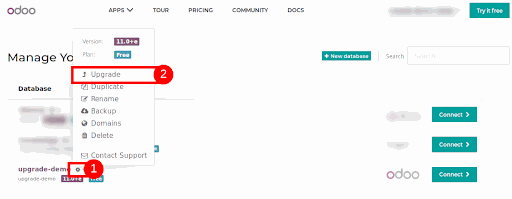
3.3 How Long Does It Take to Migrate to the Latest Odoo Version?
- What is the current version of your Odoo?
- What is the desired version you aim to migrate to?
- When do you request the migration?
- How many & how complex customizations you have in your system?
With larger implementations, the migration process is usually a completely standalone project, and it can take 3-4 months to complete.
3.4 When the Best Time to Upgrade?
Upgrade to a newer version of Odoo is always a compromise between benefits and costs. In general, we recommend upgrading your Odoo at least once in 3 years, to make sure that you are always using a supported version (as mentioned above, Odoo supports only the latest 3 versions of the system).
However, it might make sense to upgrade your Odoo more often, especially in the following cases:
- You do not have any custom modules or 3rd party applications (or you have a very limited amount of them with low complexity)
- There is a new functionality that will significantly simplify your process or automate tasks that are currently being performed manually
- You are experiencing issues with your system’s performance
4. Who Can Help You Upgrade Odoo Seamlessly
4.1 Why Work with an Odoo Partner
Although Odoo provides official upgrade tools, executing an upgrade successfully requires experience. Database handling, custom module compatibility, integration validation, and multi-environment coordination add complexity beyond the standard process.
An experienced Odoo Partner, like Portcities, brings structured methodology and risk control into the process.
Beyond technical execution, working with a certified partner provides several key advantages:
- Reduced Operational Risk – Partners conduct structured pre-upgrade audits and testing cycles to prevent unexpected downtime.
- Custom Module Compatibility – Instead of forcing reimplementation, partners assess, refactor, or modernize existing developments where feasible.
- Integration Continuity – APIs, EDI flows, and third-party systems are validated to ensure no disruption post-upgrade.
- Business Workflow Validation – Upgrades are aligned with real operational processes, not just system functionality.
- User Adoption Support – Post-upgrade guidance ensures teams can leverage new features efficiently.
Experience across multiple upgrade scenarios significantly reduces disruption. An upgrade is not only about technical compatibility, but it is about maintaining business continuity while modernizing your ERP foundation.
4.2 Portcities’ Proven Approach

Portcities brings over 15 years of Odoo expertise and has delivered more than 200 successful upgrade projects across industries and regions. The team combines technical accuracy with business understanding to ensure upgrades support real operational needs.
Portcities provides end-to-end upgrade support, covering system audits, code updates, testing coordination, go-live execution, and post-upgrade training, ensuring continuity before, during, and after the upgrade.
For example, VEOLIA successfully upgraded its Odoo system to ensure operational continuity while maintaining strict process control across entities. The project required careful validation of workflows and structured testing before production rollout.
Similarly, Sportnutrition leveraged Odoo upgrade services to modernize its system while preserving existing business logic and integrations. The result was improved performance, better maintainability, and reduced technical debt without operational disruption.
These cases demonstrate that a properly managed upgrade is not a system reset; it is a controlled evolution.
By combining official Odoo upgrade services with structured project governance and multi-version experience, Portcities ensures that your ERP remains stable, compliant, and ready for future expansion.
5. Ready to Upgrade Today, Grow Tomorrow

Upgrading Odoo is not about chasing version numbers. It is about maintaining a secure, supported, and future-ready ERP system. Regular upgrades ensure continued vendor support, smoother workflows, and access to innovation without requiring a full reimplementation.
Delaying upgrades increases long-term costs, compliance risk, and operational complexity. With proper planning and expert guidance, upgrading becomes a strategic investment in system resilience and business growth.
Ready to plan your Odoo upgrade with clarity and confidence?
Download our Odoo Upgrade Whitepaper to explore upgrade strategies, timelines, and best practices before moving to your next Odoo version.